Introduction
Cradlepoint provides networking solutions for wireless edge solutions.
Configure and install the integration
- From All Clients, select a client.
- Go to Setup > Account.
- Select the Integrations and Apps tab.
- The Installed Integrations page, where all the installed applications are displayed.
Note: If there are no installed applications, it will navigate to the Available Integrations and Apps page. - Click + ADD on the Installed Integrations page. The Available Integrations and Apps page displays all the available applications along with the newly created application with the version.
Note: You can even search for the application using the search option available. Also you can use the All Categories option to search.
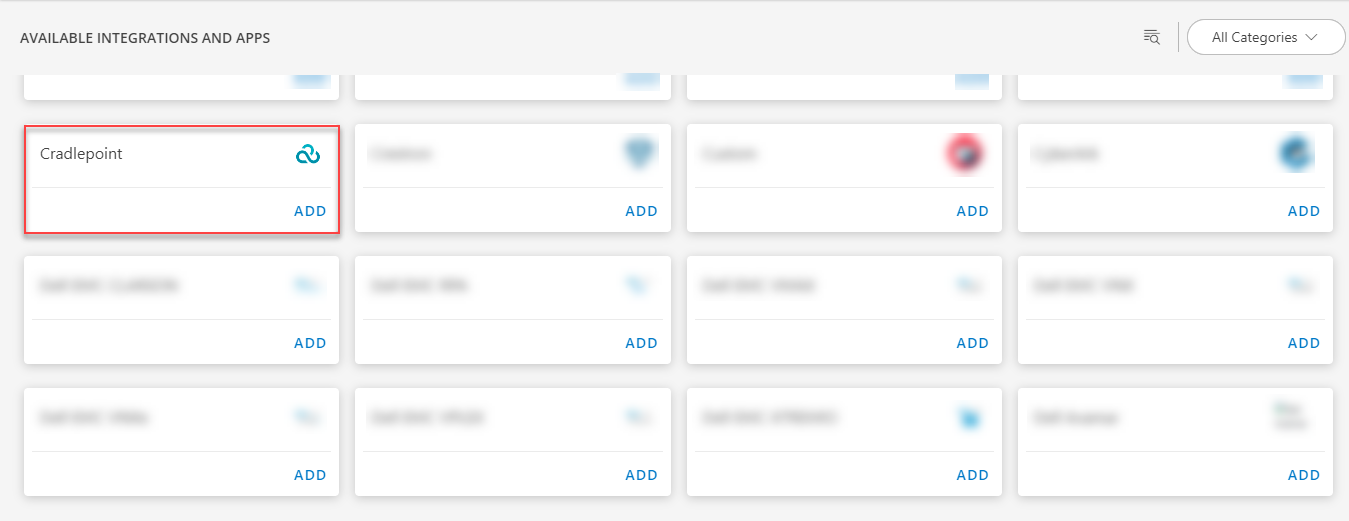
- Click ADD in the Cradlepoint application.
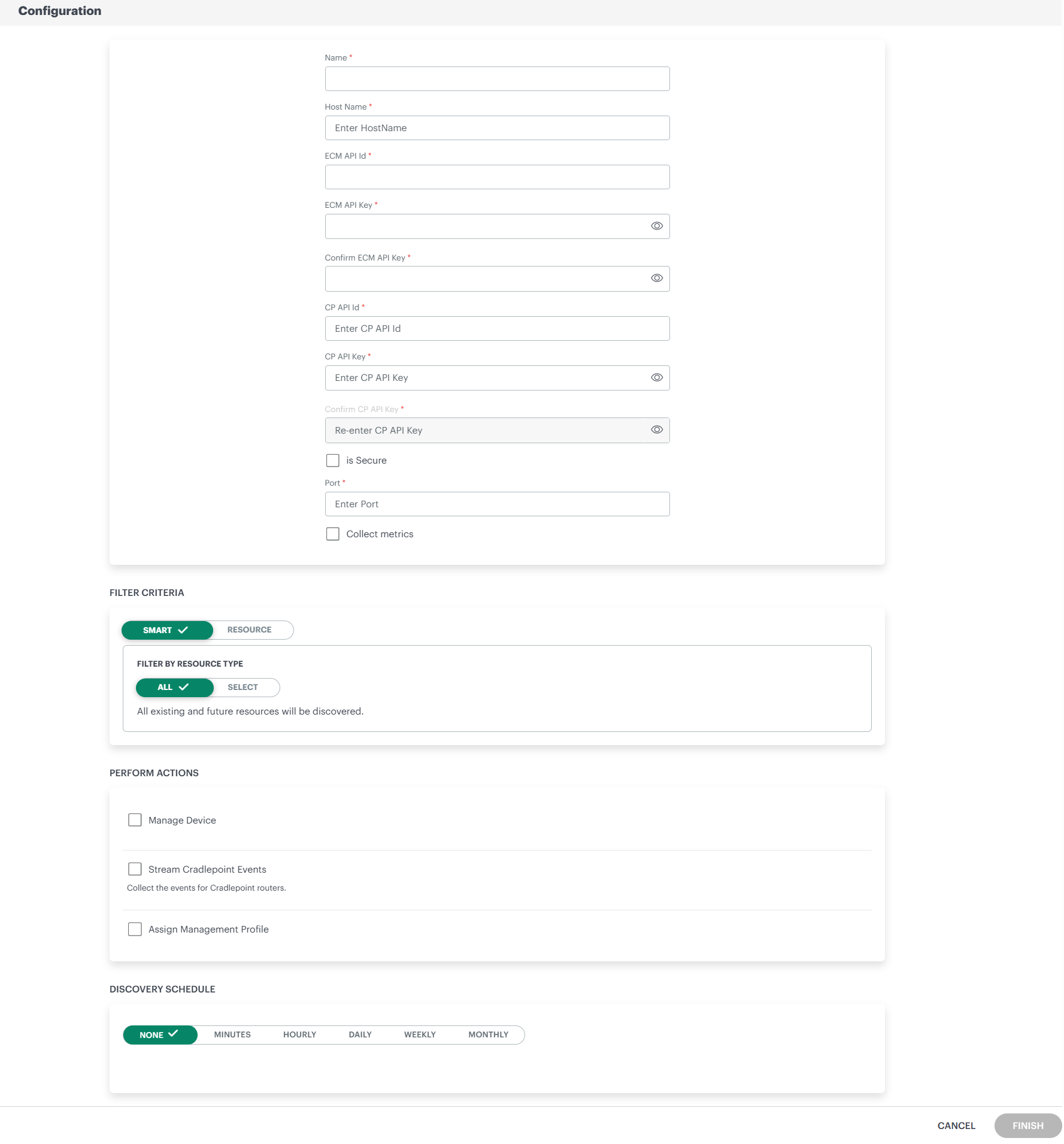
- In the Configuration page, enter the below information:
| Functionality | Description |
|---|---|
| Name | Enter the name for the configuration. |
| Host Name | Enter the host name. |
| ECM API Id | The ECM API Id is already update by default. |
| ECM API Key | The ECM API Key is already update by default. |
| Confirm ECM API Key | Enter the ECM API Key again to confirm. |
| CP API Id | Enter the CP API Id. |
| CP API Key | Enter the CP API Key. |
| is Secure | (Optional), Select the is Secure checkbox. |
| Port | Enter or select the port details. |
- From the FILTER CRITERIA section, select:
- SMART: Use to filter resources based on the resource type.
- RESOURCE: Use to filter resources based on certain resource attributes.
- In the FILTER BY RESOURCE TYPE section, select:
- ALL: All the existing and future resources will be discovered.
- SELECT: You can select one or multiple resources to be discovered.
- Enter the Key, Operator, and Value information.
- From the Perform Actions section, choose Manage Device to set the resources as managed.
- In the DISCOVERY SCHEDULE section, select recurrence pattern to add one of the following patterns:
- Minutes
- Hourly
- Daily
- Weekly
- Monthly
- Click FINISH.
The application is now installed and displayed on the INSTALLED INTEGRATIONS page. Use the search field to find the installed application.
- (Optional), Select the Cradlepoint Integration.
- (Optional), Click the ellipses and choose the View resources option.
View the Cradlepoint details
The Cradlepoint integration is displayed in the Infrastructure > Resources > Cradlepoint.
Expand Cradlepoint to view the available integrations.
You can further expand the integration to view the available resources.
You can navigate to the Attributes tab to view the discovery details, and the Metrics tab to view the metric details for Cradlepoint.
View Cradlepoint Audit Logs
To view the audit logs of Cradlepoint:
- From All Clients, select a client.
- Go to Setup > Integrations > Audit Logs.
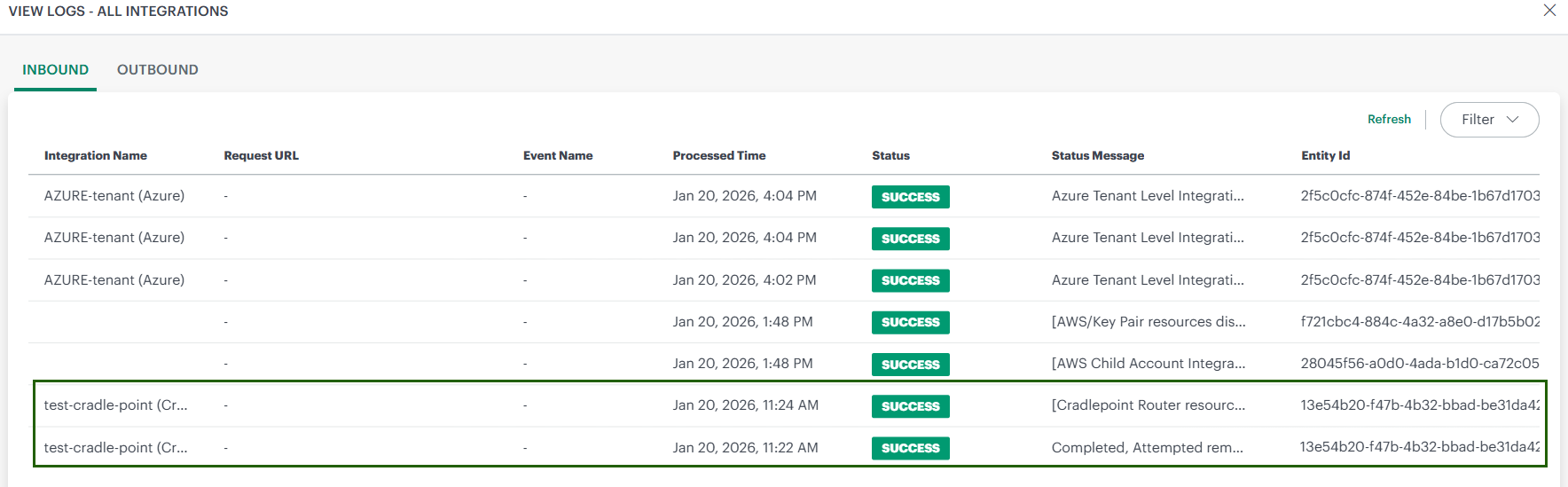
- You can view all the audit logs in the View Logs - All Integrations page.
Integration Capabilities and Monitoring Behavior
Introduction
When the CradlePoint integration is installed, OpsRamp provides end-to-end discovery, monitoring, and management of CradlePoint network infrastructure. The integration uses a hybrid monitoring approach to efficiently handle API usage and address rate-limit constraints.
During installation, you can choose to enable metric collection. Metrics are collected for supported resources only when this option is enabled, and no monitoring template is required for metric collection itself.
To generate alerts from the collected metrics, you must apply a monitoring template with defined thresholds to the relevant resources.
Note
If the Collect Metrics option is not enabled, monitoring data will not be collected even if a monitoring template is applied. Metric collection depends entirely on this setting.Supported Resources
Routers
CradlePoint edge devices that provide secure LTE/5G connectivity and function as the primary network gateway.
Network Interfaces
Physical or logical interfaces on CradlePoint routers—such as cellular, Ethernet, and Wi-Fi used for network communication and data transfer.
Locations
Logical or physical sites where CradlePoint routers are deployed, grouped, and managed.
Router Metrics
| Opsramp Metric Name | Cradlepoint Metric Name | Display Name | Description |
|---|---|---|---|
| cradlepoint_router_bytes_in | bytes_in | Total bytes received | Total bytes received |
| cradlepoint_router_bytes_out | bytes_out | Total bytes sent | Total bytes sent |
| cradlepoint_router_uptime | uptime | Router uptime | Uptime in seconds |
| cradlepoint_router_state | state | Router state | Router state (1=online, 0=offline) |
| cradlepoint_router_reboot_required | reboot_required | Router reboot required | Indicates whether reboot is required (1=reboot needed, 0=no) |
| cradlepoint_router_upgrade_pending | upgrade_pending | Router upgrade pending | Indicates whether upgrade is pending (1=upgrade pending, 0=no) |
| cradlepoint_router_config_status | config_status | Router configuration sync status | Configuration sync status (synched=1.0, anything else=0.0) |
Network Interface Metrics
| Opsramp Metric Name | Cradlepoint Metric Name | Display Name | Description |
|---|---|---|---|
| cradlepoint_interface_bytes_in | bytes_in | Interface bytes received | Interface bytes received |
| cradlepoint_interface_bytes_out | bytes_out | Interface bytes sent | Interface bytes sent |
| cradlepoint_interface_rsrp | rsrp | RSRP | Reference Signal Received Power |
| cradlepoint_interface_rsrq | rsrq | RSRQ | Reference Signal Received Quality |
| cradlepoint_interface_sinr | sinr | SINR | Signal to Interference plus Noise Ratio |
| cradlepoint_interface_dbm | dbm | Signal strength (dBm) | Received signal strength |
| cradlepoint_interface_signal_strength | signal_strength | Signal strength | Generic signal strength |
| cradlepoint_interface_rssi | rssi | RSSI | Received Signal Strength Indicator |
| cradlepoint_interface_cinr | cinr | CINR | Carrier to Interference plus Noise Ratio |
| cradlepoint_interface_cellular_health_score | cellular_health_score | Cellular health score | Overall cellular health score (0-100) |
| cradlepoint_interface_cellular_health_category | cellular_health_category | Cellular health category | Cellular health category (excellent=4, good=3, fair=2, poor=1) |
Locations: We are not supporting monitoring on locations.
ResourceTag: Router, NETWORK DEVICE, CRADLE_POINT_LOCATION
NativeType: CradlePoint Routers, CradlePoint Network Interface, CradlePoint Location
Additional Features
- Locations as Sites: CradlePoint locations are automatically created as Sites in the platform, providing a structured view of deployments.
- Hierarchical Mapping: The group hierarchy from CradlePoint is mapped directly to the site hierarchy in the platform.
- Topology Visualization: The integration provides a visual representation of the network topology for better visibility and analysis.
- Parent–Child Relationships: Routers are displayed as parent devices, with their WAN and LAN interfaces represented as child network devices.
- Each site includes all associated routers and their corresponding interfaces.
- Event Collection
- An action is available to collect events from CradlePoint routers. When enabled, the platform retrieves and displays events generated by the routers for monitoring and troubleshooting purposes.
| Category | Examples |
|---|---|
| Connectivity | WAN connected/disconnected, failover events |
| Security | Login failures, IPS events, SCEP enrollment |
| Hardware | Battery alerts, thermal limits, CPU/memory utilization |
| VPN | IPSec tunnel up/down, VRRP state changes |
| Configuration | Config sync, rejected configurations |