You can update the packages using one of the following methods:
- Method 1: Using OpsRamp Agent Remote Script (Recommended)
- Method 2: Manual Execution
Method 1: Using OpsRamp Agent Remote Script
- Navigate to Automation > Scripts v2.
- Create a Script Category (Global, Partner-specific, or Client-specific).
- Click the Add to create a new script. Provide the following script details:
- Name: Package Upgrade (Example)
- Description: Patch script
- Execution Time: 60 seconds
- Platform: Linux
- Paste this following script in the script content:
#!/bin/bash set -x export KUBECONFIG=/etc/rancher/k3s/k3s.yaml # Version thresholds MIN_VERSION="18.0.0" MAX_VERSION="20.1.2" # Usage: # $0 <registry-url> [repo-user] [repo-pass] # $0 <namespace> <registry-url> [repo-user] [repo-pass] if [[ -z "$1" ]]; then echo "Usage: $0 [namespace] <registry-url> [repo-user] [repo-pass]" echo "Example (default ns): $0 us-central1-docker.pkg.dev" echo "Example (explicit ns): $0 default us-central1-docker.pkg.dev" exit 1 fi # Namespace is optional; defaults to "default" when not provided if [[ -z "$2" ]]; then # $1 = registry, $2/$3 = optional creds NAMESPACE="default" REGISTRY="$1" REPO_USER="$2" REPO_PASS="$3" else # $1 = namespace, $2 = registry, $3/$4 = optional creds NAMESPACE="$1" REGISTRY="$2" REPO_USER="$3" REPO_PASS="$4" fi # Chart path (with runtime registry) CHART_PATH="oci://$REGISTRY/opsramp-registry/gateway-cluster-charts/webprobe" # Version comparison helpers version_gte() { [ "$1" = "$(printf "%s\n%s" "$2" "$1" | sort -V | tail -n1)" ] } version_lt() { [ "$1" != "$2" ] && [ "$1" = "$(printf "%s\n%s" "$1" "$2" | sort -V | head -n1)" ] } # Check if webprobe is installed in the namespace if ! helm list -n "$NAMESPACE" --filter '^webprobe$' --no-headers | awk '{print $1}' | grep -qx 'webprobe'; then echo "webprobe is not installed in namespace '$NAMESPACE' — skipping helm upgrade." else # Get current deployed chart/app version (kept similar to original logic) CURRENT_VERSION="$(helm list --filter '^webprobe$' -n "$NAMESPACE" | awk 'NR==2 {print $9}' | awk -F '-' '{print $NF}')" if [[ -z "$CURRENT_VERSION" ]]; then echo "Unable to determine current webprobe version in namespace '$NAMESPACE' — skipping helm upgrade." else # Only upgrade if: CURRENT_VERSION >= 18.0.0 AND CURRENT_VERSION < 20.1.2 if version_gte "$CURRENT_VERSION" "$MIN_VERSION" && version_lt "$CURRENT_VERSION" "$MAX_VERSION"; then echo "Version $CURRENT_VERSION is >= $MIN_VERSION and < $MAX_VERSION — proceeding with repo login and upgrade..." # Only login if creds are provided, and only in the eligible upgrade path if [[ -n "$REPO_USER" && -n "$REPO_PASS" ]]; then helm registry login "$REGISTRY" -u "$REPO_USER" -p "$REPO_PASS" fi helm upgrade webprobe \ "$CHART_PATH" \ --version 20.1.2 -n "$NAMESPACE" helm list --filter '^webprobe$' -n "$NAMESPACE" else echo "Version $CURRENT_VERSION is not in the eligible range (>= $MIN_VERSION and < $MAX_VERSION) — skipping helm upgrade." fi fi fi #-------------------------------- # Define working directory WORKDIR="/tmp" PATCH_ARCHIVE="2012-nextgenpatch.tar.gz" PATCH_FOLDER="2012patch" cd "$WORKDIR" wget -q "https://opsramp-gateway.s3.us-east-2.amazonaws.com/NextgenGW/PatchFiles/Patch-2000/$PATCH_ARCHIVE" mkdir -p "$PATCH_FOLDER" tar -xzf "$PATCH_ARCHIVE" -C "$PATCH_FOLDER" cd "$PATCH_FOLDER" if [ -f build.sh ]; then sh build.sh else echo "Error: build.sh not found in $PATCH_FOLDER" exit 1 fi - Click on Parameters and add the following parameters to the script.
Note
Make sure that you create the parameters in the order listed below, and provide variable values according to your specific requirements.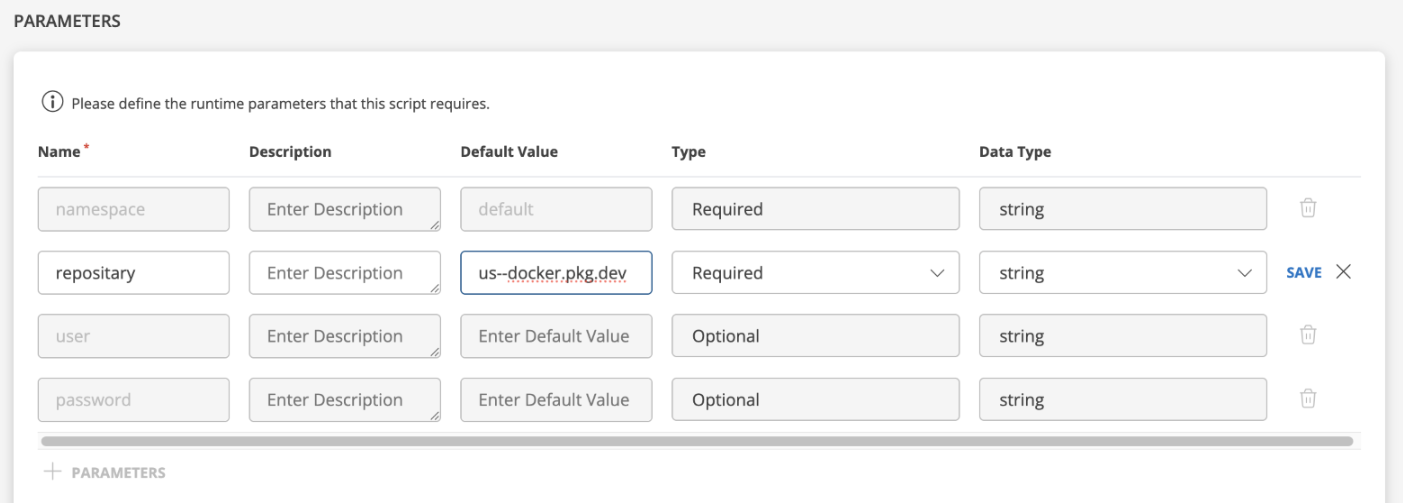
- Save the script
- Schedule the script execution:
- Select the script
- Click
Schedule(right panel) - Fill in details:
- Schedule Name
- Target Resource(s)
- Schedule Type:
One-time
- Ensure all parameter values are correctly set.
Note
If you are using a custom namespace or a custom repository, ensure you specify the repository name and provide the corresponding repository username and password. - Click Save.
- Run the Scheduled Script from the Scheduled Script section.
- Review Execution Logs from the right-side panel for the status.
Method 2: Manual Execution
Use this if Agent based execution isn’t possible.
Prerequisites
- Access to the gateway system
- Appropriate user credentials
Steps for Manual Execution:
- Login to Gateway using:
gateway-adminif nextgen gateway running with Ubuntu 22 only. - Take root access by using the following command and enter password:
sudo su -update.sh and add the following shell script to it.#!/bin/bash
set -x
export KUBECONFIG=/etc/rancher/k3s/k3s.yaml
# Version thresholds
MIN_VERSION="18.0.0"
MAX_VERSION="20.1.2"
# Usage:
# $0 <registry-url> [repo-user] [repo-pass]
# $0 <namespace> <registry-url> [repo-user] [repo-pass]
if [[ -z "$1" ]]; then
echo "Usage: $0 [namespace] <registry-url> [repo-user] [repo-pass]"
echo "Example (default ns): $0 us-central1-docker.pkg.dev"
echo "Example (explicit ns): $0 default us-central1-docker.pkg.dev"
exit 1
fi
# Namespace is optional; defaults to "default" when not provided
if [[ -z "$2" ]]; then
# $1 = registry, $2/$3 = optional creds
NAMESPACE="default"
REGISTRY="$1"
REPO_USER="$2"
REPO_PASS="$3"
else
# $1 = namespace, $2 = registry, $3/$4 = optional creds
NAMESPACE="$1"
REGISTRY="$2"
REPO_USER="$3"
REPO_PASS="$4"
fi
# Chart path (with runtime registry)
CHART_PATH="oci://$REGISTRY/opsramp-registry/gateway-cluster-charts/webprobe"
# Version comparison helpers
version_gte() {
[ "$1" = "$(printf "%s\n%s" "$2" "$1" | sort -V | tail -n1)" ]
}
version_lt() {
[ "$1" != "$2" ] && [ "$1" = "$(printf "%s\n%s" "$1" "$2" | sort -V | head -n1)" ]
}
# Check if webprobe is installed in the namespace
if ! helm list -n "$NAMESPACE" --filter '^webprobe$' --no-headers | awk '{print $1}' | grep -qx 'webprobe'; then
echo "webprobe is not installed in namespace '$NAMESPACE' — skipping helm upgrade."
else
# Get current deployed chart/app version (kept similar to original logic)
CURRENT_VERSION="$(helm list --filter '^webprobe$' -n "$NAMESPACE" | awk 'NR==2 {print $9}' | awk -F '-' '{print $NF}')"
if [[ -z "$CURRENT_VERSION" ]]; then
echo "Unable to determine current webprobe version in namespace '$NAMESPACE' — skipping helm upgrade."
else
# Only upgrade if: CURRENT_VERSION >= 18.0.0 AND CURRENT_VERSION < 20.1.2
if version_gte "$CURRENT_VERSION" "$MIN_VERSION" && version_lt "$CURRENT_VERSION" "$MAX_VERSION"; then
echo "Version $CURRENT_VERSION is >= $MIN_VERSION and < $MAX_VERSION — proceeding with repo login and upgrade..."
# Only login if creds are provided, and only in the eligible upgrade path
if [[ -n "$REPO_USER" && -n "$REPO_PASS" ]]; then
helm registry login "$REGISTRY" -u "$REPO_USER" -p "$REPO_PASS"
fi
helm upgrade webprobe \
"$CHART_PATH" \
--version 20.1.2 -n "$NAMESPACE"
helm list --filter '^webprobe$' -n "$NAMESPACE"
else
echo "Version $CURRENT_VERSION is not in the eligible range (>= $MIN_VERSION and < $MAX_VERSION) — skipping helm upgrade."
fi
fi
fi
#--------------------------------
# Define working directory
WORKDIR="/tmp"
PATCH_ARCHIVE="2012-nextgenpatch.tar.gz"
PATCH_FOLDER="2012patch"
cd "$WORKDIR"
wget -q "https://opsramp-gateway.s3.us-east-2.amazonaws.com/NextgenGW/PatchFiles/Patch-2000/$PATCH_ARCHIVE"
mkdir -p "$PATCH_FOLDER"
tar -xzf "$PATCH_ARCHIVE" -C "$PATCH_FOLDER"
cd "$PATCH_FOLDER"
if [ -f build.sh ]; then
sh build.sh
else
echo "Error: build.sh not found in $PATCH_FOLDER"
exit 1
fiSave the file.
Grant permission to the file using the following command:
chmod +x update.shRun the script using the following command:
a. Command with namespace and reposiotry
Examples:./updater.sh <namespace> <repository>- With default namespace and default repository
./updater.sh <namespace> <repository> - With custom namespace and default repository
./updater.sh <namespace> <repository>Note
Replacegateway-namespacewith your actual gateway namespace. - With custom namespace and custom repository with no credentials
./updater.sh <namespace> <repository>Note
Replacegateway-namespaceandcustom-repositorywith your actual namespace and repository URL.
b. Command with namespace and custom repository with authorization
Example./updater.sh <namespace> <repository_name> < repository_username < repository_password>sh updater.sh gateway-namespace custom-repository repository_username repository_passwordNote
Replace the placeholders with your actualnamespace,repository URL,username, andpassword.- With default namespace and default repository
Verify the Webprobe Helm version (should be
20.0.1).helm list | grep webprobeAccess the Webprobe container:
kubectl exec -it -n <namespace> webprobe-0 -- bashCheck the installed browser/driver versions:
msedgedriver --version
google-chrome --version
chromedriver --version
dpkg -l | grep -E "chrome|edge"
Exit the webprobe pod by running:
exitTo verify the updated kernel and open-vm-tools versions, run the following commands:
uname -r
dpkg -l | grep "open-vm-tools"
Expected Versions:
| Package | Expected Version |
|---|---|
| Google Chrome | 144.0.7559.96 |
| Microsoft Edge | 144.0.3719.82 |
| Open-vm-tools | 2:12.3.5-3~ubuntu0.22.04.3 |
| Linux Kernels | 5.15.0-164-generic |
Note: Make sure to reboot the gateway to reflect the updated kernel version.